Prerequisites
-
The Butchery Recipe checkbox (Masters ➜ Recipes ➜ Create New or Edit Recipe) must be enabled to add one inventory item as an ingredient to the recipe as a raw item.
-
Enable the Recipe Approval checkbox under Setup ➜ System Preferences ➜ Database Options.
-
If this option is enabled, users will not be able to add a sub-recipe as an ingredient.
-
If this option is disabled, users can add multiple ingredients (both inventory and sub-recipe).
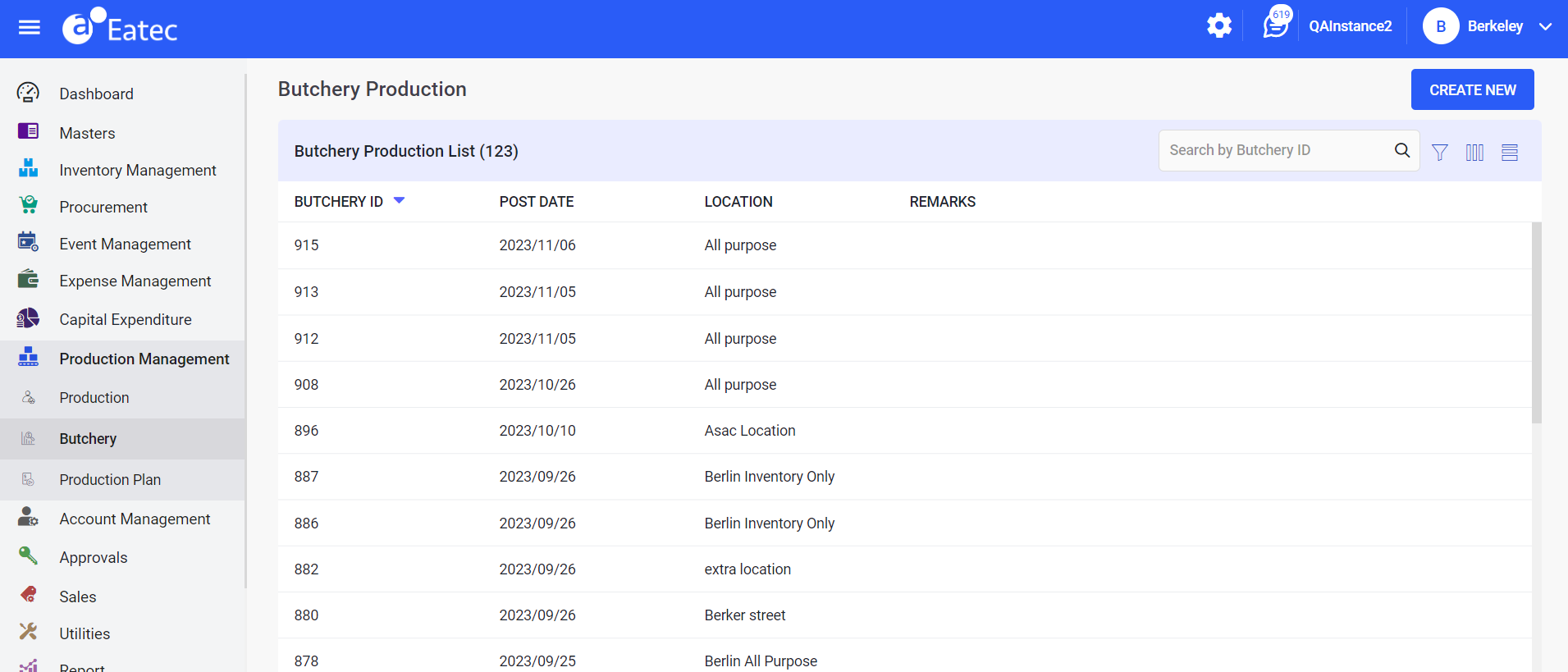
Navigate to Production Management ➜ Butchery. The Butchery Production page appears with the posted butchery transactions under the Butchery Production List section:
|
Field |
Description |
|---|---|
|
Butchery ID |
The system-generated transaction number. |
|
Post Date |
The date on which the butchery production was created/posted. By default, the current date is displayed. |
|
Location |
The location defined for the site where butchery production was created. |
|
Remarks |
Optional text field. |
Users can perform the following functions under Butchery:
-
Create new butchery production
-
Modifying butchery production
-
Duplicating butchery production
-
Filtering butchery production
-
Viewing butchery production
-
Printing butchery production