Sales Activity
Catering Sales Summary/All Finalized Orders [SLS51C] Report
This report generates sales orders activity summary by location/outlet.
Click Report ➜ Report. The New Report page appears.
Select Sales Orders.
Select Sales Activity from the Section drop-down list.
Select Catering Sales Summary / All Finalized Orders [SLS51C] from the Reports drop-down list.
Apply the following filters to generate the report:
Report Parameters
|
Field |
Description |
|---|---|
|
Period |
|
|
Period |
Select a predefined date range to quickly set the reporting period. Available options include commonly used ranges such as Today, Yesterday, Current Week, Last Week, Current Month, Last Month, Current Quarter, Last Quarter, Current Year, Last Year, Next Week, Next Month, Current Financial Period, and Last Financial Period. Select Custom to manually define the date range using the Start Date and End Date fields. |
|
Start Date |
Select the start date for the report using the date picker. The report includes transactions from this date onward. |
|
End Date |
Select the end date for the report using the date picker. The report includes transactions up to and including this date. |
|
Filter |
|
|
Order Types |
Select the order type to filter the results. Use Exclude to omit the selected values. |
|
Classes |
Select classes to refine the results. Use Exclude to omit the selected values. |
|
Service Types |
Select service types to refine the results. Use Exclude to omit the selected values. |
|
Sales Person |
Select the sales person to filter the results. Use Exclude to omit the selected values. |
|
Locations |
Select one or more locations to filter the results. Use Exclude to omit the selected values. |
|
Rooms |
Select rooms to refine the results. Use Exclude to omit the selected values. |
|
Status |
Select the status to filter the records. Use Exclude to omit the selected values. |
|
Customer |
Select the customer to filter the results. Use Exclude to omit the selected values. |
|
Misc 1 |
Enter additional information to filter results (up to 255 characters); use Exclude to omit matching records. |
Click Generate Report.
Sample Report
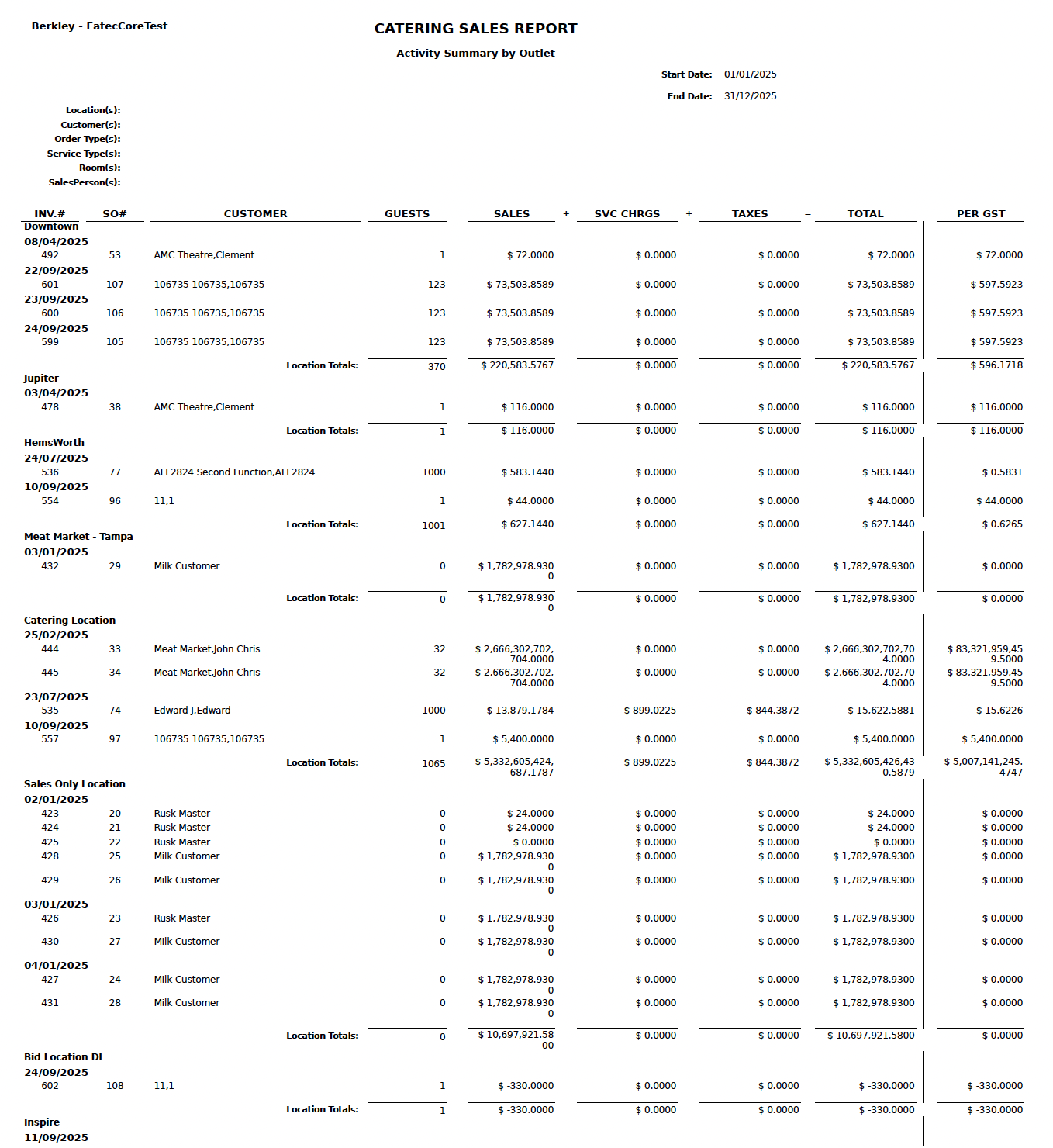
Report Fields
|
Field |
Description |
|---|---|
|
INV.# |
Displays the invoice number associated with the transaction. |
|
SO# |
Displays the sales order number linked to the invoice. |
|
Customer |
Displays the customer associated with the order. |
|
Guests |
Indicates the number of guests for the order or event. |
|
Sales |
Displays the base sales amount before additional charges. |
|
SVC CHRGS |
Displays the service charges applied to the order. |
|
Taxes |
Displays the tax amount applied to the order. |
|
Total |
Displays the total order amount including sales, service charges, and taxes. |
|
Per Gst |
Displays the calculated amount per guest. |