Inventory Reports
Database
Current Negative QOH [ING03NEG] Report
The generated report provides only the details of the inventory item(s) with current Quantity On Hand (QOH) less than zero, grouped by inventory type.
Items with negative Quantity and Value currently in Eatec system. This report is helpful in identifying items which have missing receipt (receiving) entries and/or incorrect recipe setup (inflated depletion).
Report Parameters
Navigate to the Report screen (Menu ➜ Report ➜ Report).
Select Inventory in the module-selecting drop-down list.
|
Field |
Description |
|---|---|
|
Section |
Select Database |
|
Reports |
Select Current Negative QOH [ING03NEG] |
|
Filters |
|
|
Inventory Types |
Select preferred inventory types against which the report must be generated. All inventory types available in the property will be displayed as options. The following are results of having the Exclude flag:
|
|
Classes |
Select preferred item classes against which the report must be generated. All classes available in the property will be displayed as options. The following are results of having the Exclude flag:
|
|
Packages |
Select preferred packages against which the report must be generated. All packages available in the property will be displayed as options. The following are results of having the Exclude flag:
|
|
Locations |
Select preferred locations against which the report must be generated. All inventory types available in the property will be displayed as options. The following are results of having the Exclude flag:
|
|
Chart of Accounts |
Select preferred account charts against which the report must be generated. All charts of accounts available in the property will be displayed as options. The following are results of having the Exclude flag:
|
|
Supplier |
Select preferred supplier against which the report must be generated. All suppliers available in the property will be displayed as options. The following are results of having the Exclude flag:
|
|
Subtype |
Select preferred inventory subtypes against which the report must be generated. All inventory subtypes available in the property will be displayed as options. The following are results of having the Exclude flag:
|
|
Item |
Select preferred inventory items against which the report must be generated. All inventory items available in the property will be displayed as options. The following are results of having the Exclude flag:
|
Click Generate Report.
Sample Report
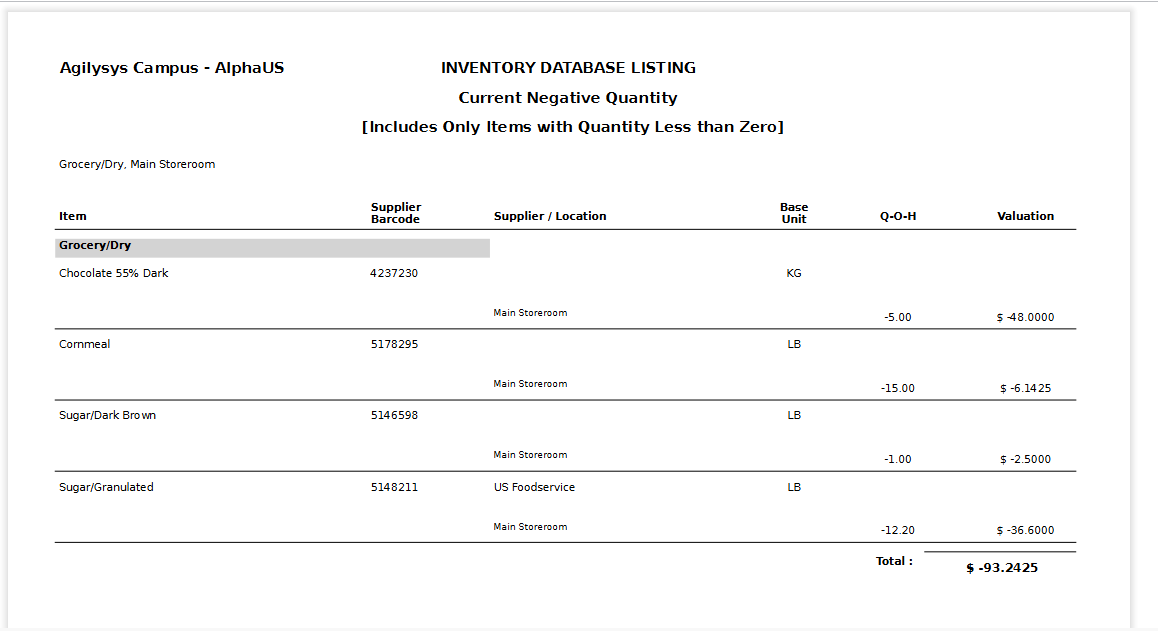
Report Fields
The selected filters will be displayed on the top and if the Exclude flag was selected for any filter, the suffix, NOT, will also be displayed before that filter.
|
Field |
Description |
|---|---|
|
Item |
Name of the inventory item |
|
Supplier Barcode |
The barcode of the item supplier |
|
Supplier/Location |
The name of the supplier and location where the item is available |
|
Base Unit |
The unit in which the item is measured |
|
Q-O-H |
The quantity of the item available (Quantity on Hand) |
|
Valuation |
The valuation of the available item |