Activity
Product Sales/Item by Type [SLS01] Report
Navigate to Report ➜ Report.
Select Products from the drop-down menu.
Select Activity from the Section drop-down menu.
Select Product Sales/Item by Type (SLS01) from the Reports drop-down menu.
Enter the details in the applicable filters under the Filters section.
Report Parameters
|
Field |
Description |
|---|---|
|
Filters |
|
|
Product Types |
Select preferred product type against which the report must be generated. All product types available in the property will be displayed as options. The following are results of having the Exclude flag:
|
|
Classes |
Report inventory details for selected classes. Enable the Exclude checkbox to exclude the Classes filter. |
|
Packages |
Select the preferred inventory packages from the drop-down list Enable the Exclude checkbox to exclude the Packages filter. |
|
Product |
Select the preferred inventory packages from the drop-down list Enable the Exclude checkbox to exclude the Packages filter. |
|
Sub Type |
Report item activity for items from selected inventory subtypes. Enable the Exclude checkbox to exclude the Sub Type filter. |
|
Price Range |
Enter the preferred price range. Enable the Exclude checkbox to exclude the Price Range filter. |
Sample Reports
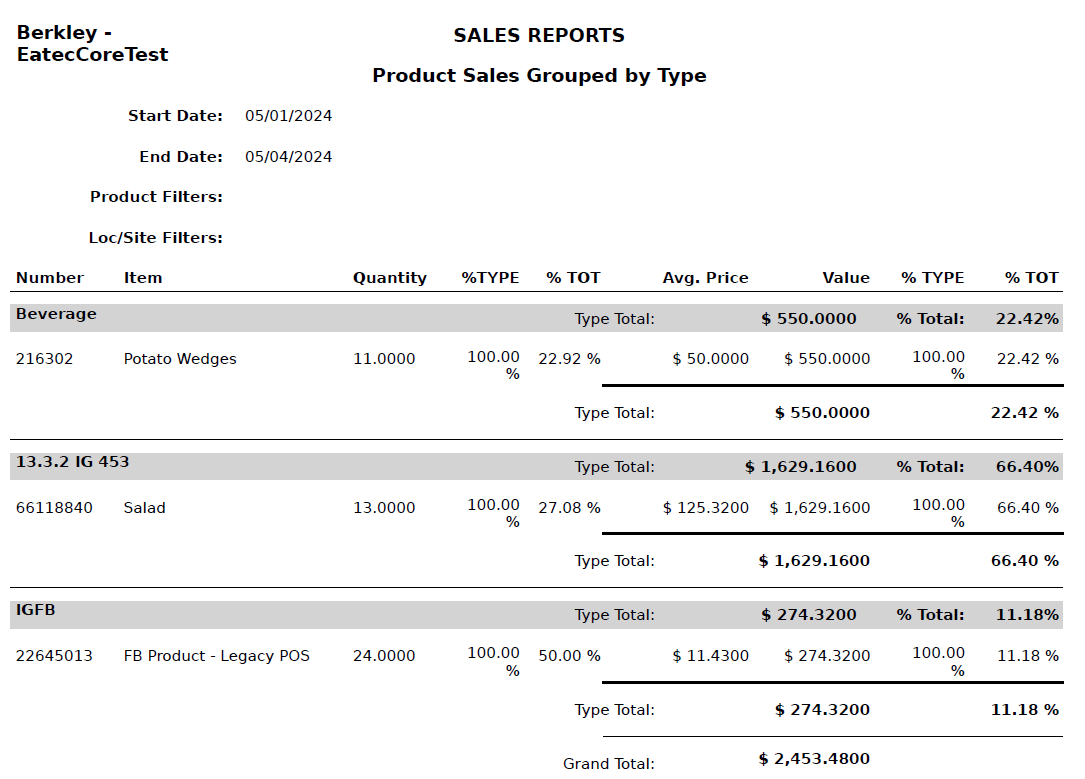
Report Fields
|
Field |
Description |
|---|---|
|
Start Date |
Specifies the beginning date of the reporting period. |
|
End Date |
Specifies the end date of the reporting period. |
|
Product Filters |
Displays the selected product filters used to generate the report. |
|
Loc/Site Filters |
Displays the selected location or site filters. |
|
Number |
Displays the unique identifier assigned to the item. |
|
Item |
Displays the item name. |
|
Quantity |
Shows the total quantity sold during the period. |
|
% Type (Qty) |
Shows the percentage contribution of the item quantity within its type. |
|
% Total (Qty) |
Shows the percentage contribution of the item quantity to the overall total. |
|
Avg. Price |
Displays the average selling price per unit. |
|
Value |
Displays the total sales value for the item. |
|
% Type (Value) |
Shows the percentage contribution of the item value within its type. |
|
% Total (Value) |
Shows the percentage contribution of the item value to the overall total. |
|
Type Total |
Displays the total sales value and percentage for each product type. |
|
Grand Total |
Displays the overall total sales value across all product types. |